How Syncs Work
Propexo Connect uses two types of syncs to build and maintain your data: a recurring sync that keeps your data current, and a backsync that fills in your historical baseline. Together they give you a complete timeline, from the oldest record available in your source system through to the most recent data, refreshed on your schedule.
Recurring Syncs
Recurring syncs run on a schedule you define, typically daily, weekly, or monthly. The first run fires as soon as you connect and pulls an initial window of recent data, typically the last 30 days. Every run after that pulls only the records created or updated since the last successful sync. On a daily schedule, each subsequent run covers roughly the prior 24 hours; on a weekly schedule, the prior 7 days.
The windows tile end to end, so every run picks up exactly where the previous one stopped. There are no gaps and no redundant re-pulls of data you already have.
If a scheduled run fails or is skipped, the next run's window extends back to the last successful sync. Nothing is missed; the next run simply covers a larger window.
The sync window is configurable, and the practical options depend on your data source. Some source systems expose reliable modified-date filtering that supports tight, precise windows; others require broader windows to guarantee completeness. During onboarding, we configure the recurring window that fits your source's capabilities and your reporting needs.
Backsyncs
While recurring syncs move forward in time, backsyncs work backward. A backsync fills in your historical data by pulling it in sequential chunks, starting exactly where the first recurring sync's window ends and stepping progressively further into the past. Because the first run already covered the most recent 30 days, the first backsync chunk covers days 30 to 60 back, the next chunk days 60 to 90, and so on until Connect has retrieved all historical data the source makes available. The two never overlap: no record is pulled twice, and no window is left uncovered.
Backsync chunks run on a normal cadence rather than all at once, spreading the backfill load over time while your recurring syncs continue on schedule.
- Chunk size is configurable, typically between 30 and 90 days per chunk. The right size depends on the data source: how much data the source returns per request, its rate limits, and how far back its API or export mechanism can reach. Larger chunks complete the backfill in fewer passes; smaller chunks put less load on the source system per request. We tune this per connection.
- Historical depth is ultimately determined by the source system. Some sources retain and expose their full history; others cap historical access at a fixed lookback period. Your backsync will retrieve everything the source allows.
How They Work Together
The seam between the two sync types is the start of the first run's window, typically 30 days before you connect. Recurring syncs cover everything from that point forward. Backsyncs cover everything before it. Because the backsync's first chunk begins exactly where the first run's window ends, there is no gap and no overlap between them.
The two run independently. Fresh data starts flowing on your first recurring sync, and your historical baseline fills in behind it as backsync chunks complete. You do not have to wait for the backfill to finish before working with current data. Each completed chunk immediately extends how far back your dataset reaches, and once the backsync exhausts the source's history, your data is complete and stays current through the recurring schedule alone.
Setting the Schedule
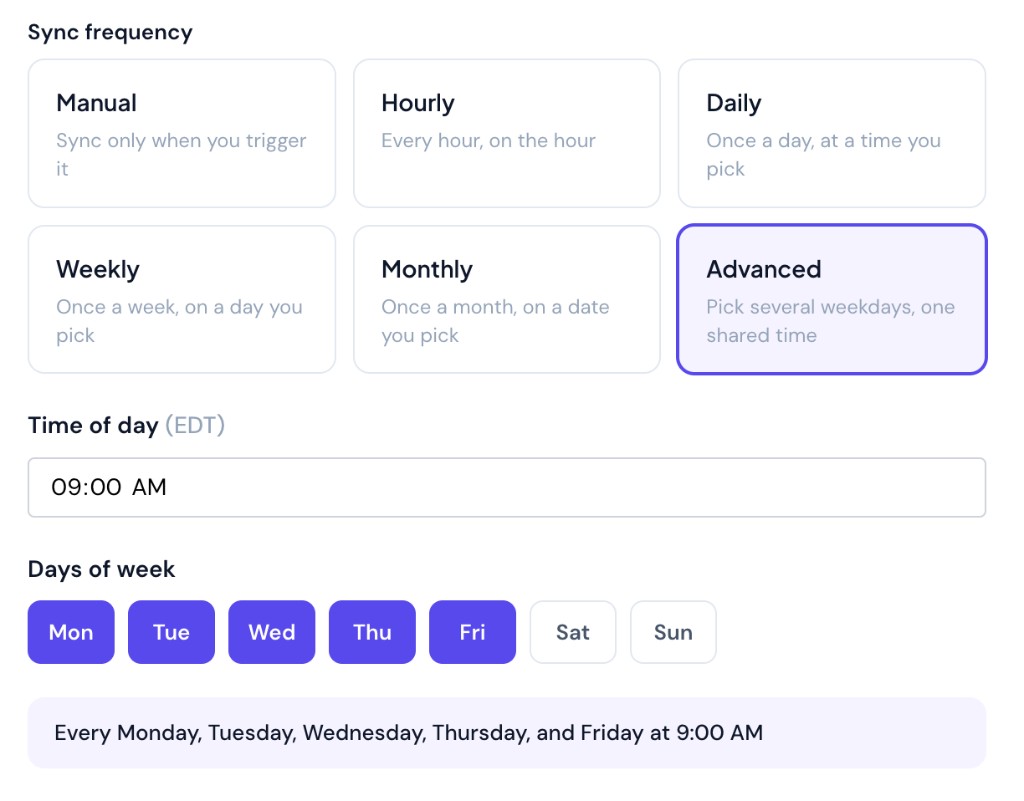
Every connection has a sync frequency, set in the console when you create or edit the connection:
| Frequency | How It Works |
|---|---|
| Manual | Syncs only run when you trigger them |
| Hourly | Every hour, on the hour |
| Daily | Once a day, at a time you pick |
| Weekly | Once a week, on a day you pick |
| Monthly | Once a month, on a date you pick |
| Advanced | Several weekdays of your choosing, at one shared time, for example every weekday at 9:00 AM |
Times are set as a local time of day; the console shows the timezone your selection will be interpreted in.
Manual Syncs
When a connection is set to Manual, no syncs run automatically. Click the Manual sync button in the console to trigger a sync whenever you're ready. Manual mode is useful for:
- Initial testing of a new connection
- Data sets that change infrequently (e.g., a portfolio or locations list that only updates on rare corporate events)
Custom Cron Expressions
Under the hood, every schedule compiles to a cron expression. If the presets don't cover your cadence, you can enter a cron expression directly for full control over sync timing.
Concurrency and Rate Limits
Each connection runs one recurring sync at a time. If a new recurring sync is due while a previous one is still running, it queues and begins once the active sync finishes, and no scheduled execution is skipped. Because each run covers everything since the last successful sync, a queued or delayed run has no effect on completeness; it simply covers a slightly larger window.
Backsyncs are the exception: a backsync chunk can run alongside a recurring sync. When the two overlap, they share the source's rate limit, with the backsync configured to use a lower percentage of it, so the backfill makes progress in the background without slowing down the sync that keeps your data current.
Configuration Summary
Both sync types have configurable time parameters, and both are constrained by what the source connection supports:
- Recurring syncs: The schedule (daily, weekly, monthly, etc.) is set by you. The initial window (typically 30 days) and the ongoing since-last-sync windows are configurable and depend on the source's filtering capabilities.
- Backsyncs: Chunk size (typically 30 to 90 days) is tuned per connection based on source API limits and data volume. Total historical depth is bounded by the source's retention and lookback limits.
If you have questions about what your specific source supports, reach out to our team and we can walk through the configuration for your connection.